
Agent Workspace

May 19, 2026
Operation

Agent Workspace is a WhatsApp Business console for teams that want an AI to handle inbound chats first and humans to step in when they want to. One screen covers the live inbox, the customer record, support tickets, and the sales conversion log. The same app is where admins upload the AI's instructions, skills, and grounding documents.

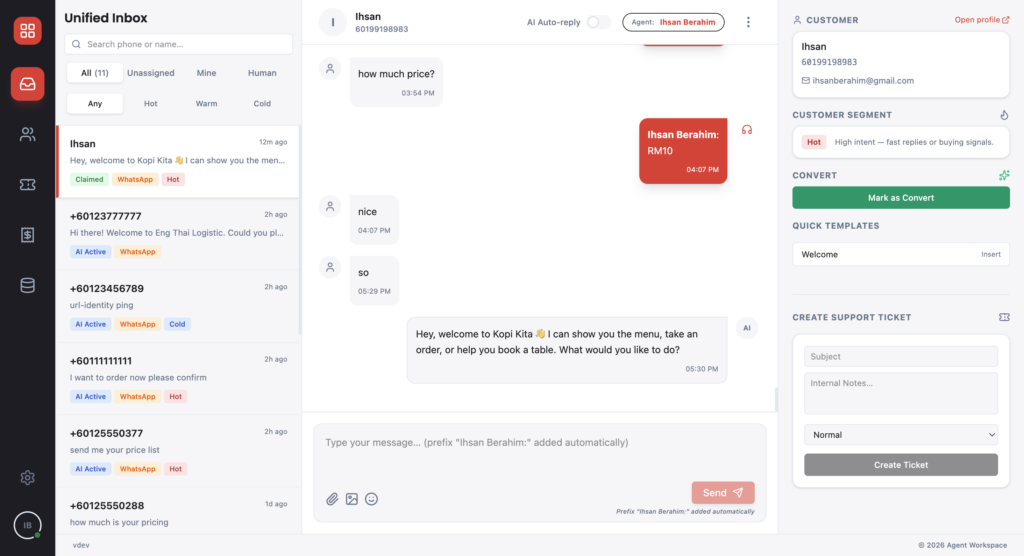
The inbox has three columns: conversation list on the left, the chat in the middle, the customer's profile on the right. Flip the AI toggle off and the chat is yours; flip it back on when you're done. From the customer panel you can drop a quick template, raise a ticket, or log a converted sale.

Public user guide: agentworkspace.web.app
Agentworkspace dashboard

One workspace for WhatsApp Business where the AI takes the first shot at every chat, any agent can grab it back, and every ticket and sale is logged. Admins manage the AI's instructions and grounding from the same app.

  • The AI replies by default. An agent claims any chat with one toggle and gives it back when done.
  • The conversation list filters by All, Unassigned, Mine, and Human. A second row of chips filters by lead segment (Hot, Warm, Cold).
  • Each chat opens a customer record (identity, contact, company, address, notes) with the current segment and lifecycle status, editable inline.
  • Tickets have four statuses (Open, In Progress, Resolved, Closed) and four priorities. Each has comments, internal-only notes, a link back to the originating chat, and a per-record audit log.
  • Sales get stable IDs like SAL-…, an amount, a product line, and a lifecycle status (pending, confirmed, refunded, cancelled), attributed to whoever marked the conversion.
  • The Knowledge Base is admin-only and has three tabs: Instruction, Skills, Grounding. Uploads are versioned and indexed, and any item can be disabled without being deleted.
  • Settings covers personas, skills, MCP integrations, channels, sales attribution, quick + WhatsApp templates, SMTP, outbound webhooks, lead segmentation, browser notifications, agents and roles, authentication.
  • The user guide walks through a full loop: customer message lands in the inbox, agent claims, replies, raises a ticket, marks Convert, and a confirmed sale row appears in the Sales list.

Overview

Developed for OpenMinds Resources

Built in Live on Cloud Run (asia-southeast1); ongoing — guide last updated May 2026

Tech Stack
Byteplus WhatsApp Business
Byteplus Function Service
Byteplus Torch Object Service
Firebase Cloud Messaging (browser push)

Problems Solved

A brand on WhatsApp Business has two bad options. Pure-human chat doesn't scale, especially after hours. A pure bot eventually says the wrong thing to the wrong customer, misses a sale, and leaves you with nothing to audit when someone asks what happened. Operators also have nowhere obvious to put the bot's instructions, brand voice, or product knowledge once they outgrow a single system prompt.

Agent Workspace sits between the two. The AI takes every incoming chat. A human can claim it with one toggle and hand it back the same way. Every escalation becomes a ticket; every conversion becomes a sale. A keyword-and-response-time classifier sorts incoming leads into Hot, Warm, or Cold so the busiest chats float to the top.

Tell us how we can help you and let’s start!

sprint@openmindsresources.com